> For the complete documentation index, see [llms.txt](https://help.sipgate.de/llms.txt). Markdown versions of documentation pages are available by appending `.md` to page URLs; this page is available as [Markdown](https://help.sipgate.de/conversation-intelligence/conversation-intelligence-en/manage-custom-fields.md). Agents can also search and read this documentation through its [MCP server](https://help.sipgate.de/~gitbook/mcp).
# Manage custom fields
With Custom Fields, you define which content the AI collects from your conversations and stores in the Data Hub.
## What are Custom Fields?
Custom Fields are fields that you define centrally as an admin. After each conversation, the AI analyzes the transcript and extracts the content you described in the fields, for example a reason for the call, a customer number, or a topic. Conversation Intelligence stores the results in a structured way in a separate column in the [Data Hub](https://help.sipgate.de/conversation-intelligence/conversation-intelligence-en/data-hub.md).
If the AI does not find a suitable value in a conversation, the field for that call remains empty. No values are invented.
{% hint style="info" %}
Prerequisite: You have admin rights, and Conversation Intelligence is activated for the channel (see [Getting started](https://help.sipgate.de/conversation-intelligence/conversation-intelligence-en/getting-started.md)).
{% endhint %}
## What predefined fields are there?
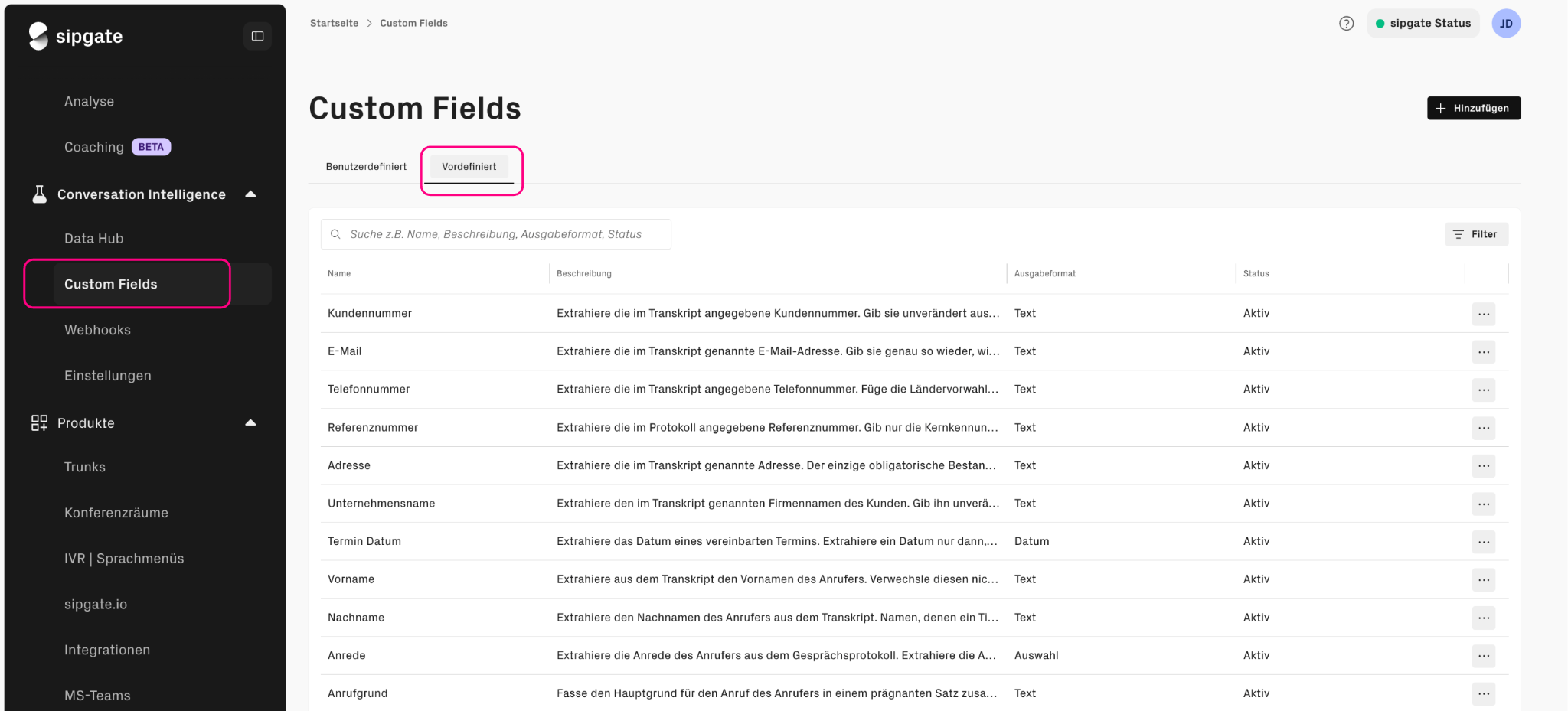
There are predefined Custom Fields that are collected immediately as soon as Conversation Intelligence is activated. These include first name, last name, salutation, reason for call, customer number, reference number, email, phone number, company name, address, appointment date, appointment time, topics, and summary.
Predefined fields cannot be edited. However, you can deactivate them via the menu (three dots) in the field row if they do not fit your use case.
## What output formats are available?
Depending on what type of information you want to collect from a conversation, choose one of the following output formats:
| Output format | Description |
| ------------- | ---------------------------------------------------------------------------------------------------------------------------- |
| **Text** | Captures a free-text answer, e.g. a short summary or a verbatim quote from the conversation. |
| **Number** | Captures a numerical value without an attached unit, e.g. a contract term mentioned or an amount. |
| **Date** | Captures a date mentioned in the conversation, e.g. an agreed callback date. |
| **Time** | Captures a time mentioned in the conversation, e.g. the desired time for a callback. |
| **Yes/No** | Captures a binary assessment, e.g. whether a specific concern was mentioned in the conversation or not. |
| **Selection** | Assigns the conversation to one of the predefined options. You define the possible options yourself when creating the field. |
## How do I create my own Custom Field?
In addition to the predefined fields, you can create custom Custom Fields tailored to your use case, your business model, your industry, or your team.
{% stepper %}
{% step %}
## Add field
Open **Conversation Intelligence → Custom Fields** and click **Add**.
{% endstep %}
{% step %}
## Name field
Name the field.
{% endstep %}
{% step %}
## Describe prompt
Describe in a prompt how the field content should be collected.
{% endstep %}
{% step %}
## Choose output format
Choose the output format. If you choose the output format **Selection** also describe the possible options.
{% endstep %}
{% step %}
## Save field
Save the field.
{% endstep %}
{% endstepper %}
The field is active immediately and will be filled according to your definition starting with the next call. Calls that have already taken place are not evaluated retroactively. If a call returns a result, the value is stored in a separate column in the Data Hub.
**Example**
* **Field name:** Interest
* **Field prompt:** "Did the caller show interest in a specific feature?"
* **Output format:** Selection, with the options "Transcription", "Custom Fields", "Webhooks", and "No interest"
## How do I formulate a good field prompt?
The more precise the prompt, the more reliable the result:
* State the expected format, e.g. "Output the customer number as a plain number."
* Provide example values.
* Describe edge cases, e.g. "If no customer number is mentioned, output nothing."
* Avoid vague wording such as "Why is the customer calling?" Better: "State the reason for the call in no more than five words."
## In which language are Custom Fields output?
Your Custom Fields results are output in a language that you set in the settings. To do this, open **Conversation Intelligence → Settings** and select in the section **Output language** section **Language of the Custom Fields** a fixed language or **use transcript language**. Existing results in the Data Hub remain in the previous language.
## How do I edit, deactivate, or delete a field?
* **Deactivate:** Via the menu (three dots) in the field row. The field will then no longer be collected. You can reactivate deactivated fields at any time.
* **Edit and delete:** Only possible for custom fields. When deleted, the collected values are lost.
## What do I need to consider for my own Custom Fields?
{% hint style="warning" %}
If you define your own Custom Fields, you are solely responsible for ensuring that they comply with the applicable legal requirements, in particular with data protection and labor law requirements. Avoid fields that allow conclusions to be drawn about the individual performance of individual employees. More on this under [Privacy](https://help.sipgate.de/conversation-intelligence/conversation-intelligence-en/data-protection.md).
{% endhint %}
---
# Agent Instructions
This documentation is published with GitBook. GitBook is the documentation platform designed so that both humans and AI agents can read, navigate, and reason over technical content effectively. Learn more at gitbook.com.
## Querying This Documentation
If you need additional information that is not directly available in this page, you can query the documentation by asking a question.
Perform an HTTP GET request on the following URL with the `ask` and `goal` query parameters:
```
GET https://help.sipgate.de/conversation-intelligence/conversation-intelligence-en/manage-custom-fields.md?ask=&goal=
```
`ask` is the immediate question: it should be specific, self-contained, and written in natural language.
`goal` is what the user is ultimately trying to achieve, the reason they need the answer. Sharing it helps GitBook give you a better, more relevant answer. A goal is most helpful when it describes the outcome the user wants rather than restating the question. For example, with `ask=how do I create an API token`, a goal like `automate deployments from our CI pipeline` lets GitBook tailor the answer to that use case.
The response will contain a direct answer to the question and relevant excerpts and sources from the documentation.
Use this mechanism when the answer is not explicitly present in the current page, you need clarification or additional context, or you want to retrieve related documentation sections.