> For the complete documentation index, see [llms.txt](https://help.sipgate.de/llms.txt). Markdown versions of documentation pages are available by appending `.md` to page URLs; this page is available as [Markdown](https://help.sipgate.de/cloud-telefonanlage/en/using-sipgate/die-sipgate-app/kann-ich-anrufe-in-der-sipgate-app-ueber-die-tasten-am-headset-annehmen.md).
# Can I answer calls in the sipgate app using the buttons on the headset?
How to answer calls in the sipgate app using the headset button (HID) – requirements and FAQs.
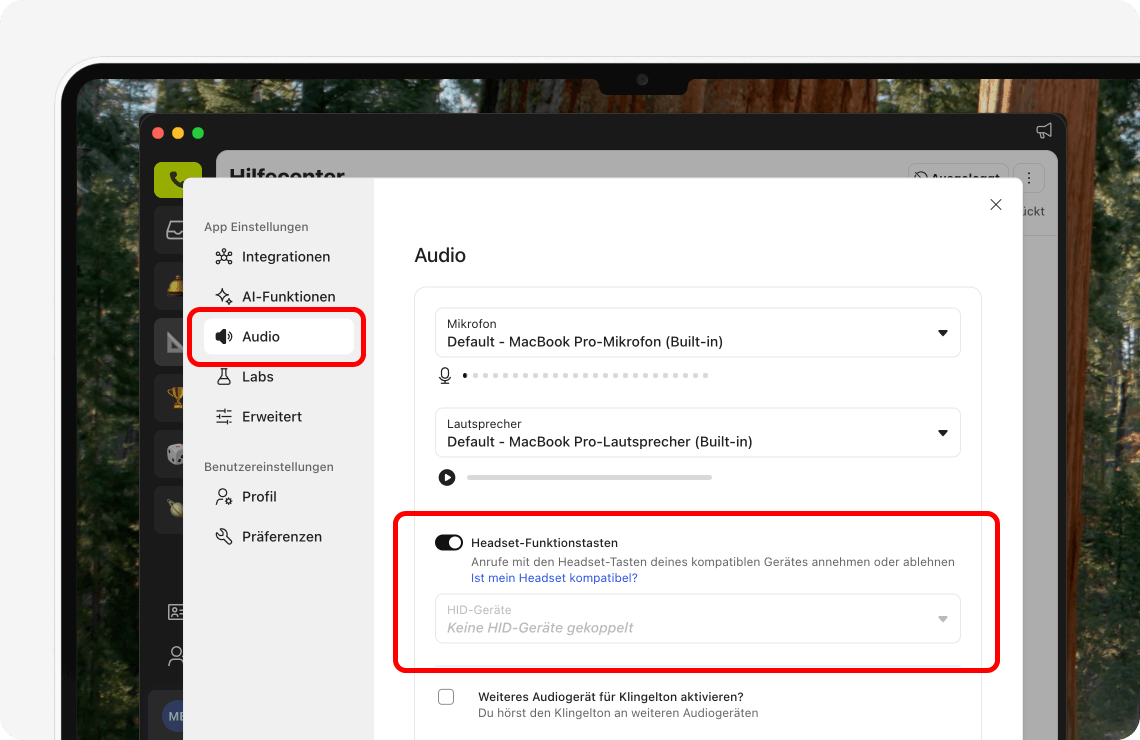
You can answer and end calls in the sipgate app using the HID buttons on the headset. In this article you will find frequently asked questions about this topic.
{% hint style="warning" %}
Important: Answering calls via the HID buttons on the headset currently works in the sipgate app in the browser only with Chrome and Edge. The appropriate permission must be granted in the browser.
{% endhint %}
#### **Which headsets support the buttons (answer & hang up)?**
The following list contains the headsets we have tested for compatibility with the sipgate app:
Collapsible list
```
**Bluetooth (softphone) with Jabra Link 380 dongle**
```
* Jabra 2 Evolve 65 (Link)
* Jabra 2 Evolve 30 SE
* Jabra 2 Evolve 85
* Jabra 710 (speakerphone)
```
**PSTN (Desk Phone)**
```
* PRO 9470
* PRO 9465 DUO
* PRO 9460 DUO
* PRO 9460
* PRO 9450
* PRO 920
* PRO 925
* PRO 935
* Motion Office
* Yealink WH62 (green phone icon on the base must be active)
```
**USB (Softphone)**
```
* BIZ2300
* LINK230
* LINK260
* Link265
* Evolve 80
* Evolve 40
* Evolve 30 (MacOS + Windows)
* Evolve 20
* Jabra Evolve 75 (with cable or USB adapter)
* BIZ 2400
* Link 280
* PRO 935
* Evolve 65 (Link360 dongle)
* Motion (Link360 dongle)
* Speak 510+ (Link360)
* Supreme (Link360 dongle)
* Stealth (Link360 dongle)
* UCVoice 750a
* UCVoice 550a
* UCVoice250a
* UCVoice150a
* BIZ 2400
* Link 280
* Speak 510 (via USB)
* Speak 410
* Motion Office
* Dial 550
* Link 180
* Sennheiser Epos Adapt 560\\
* EPOS IMPACT 400 (with cable or USB adapter)
* EPOS IMPACT 500 (with cable or USB adapter)
* EPOS ADAPT 660C (with cable or USB adapter)
* EPOS IMPACT 860T ANC (with cable or USB adapter)
#### **My headset is listed, but the buttons (answer & hang up) do not work:**
Here you will find known solutions to the problem:
**Cause:** Integrated Bluetooth of the computer/laptop or any Bluetooth USB dongle is used\
**Solution:** Use original Jabra Link 380 dongle or cable connection with USB-C
**Cause**: Headset is controlled by another VoIP/SIP app such as Teams/Discord\
**Solution**: close the other application, then try the headset buttons again
**Cause 1:** MacOS/Win BT Jabra headset connected via Bluetooth\
**Solution 1:** MacOS/Win BT plug in USB Link 380/390 and connect the BT headset via it\
**Cause 2:** Linux + any headset\
**Solution 2:** unknown
#### **The following headsets cannot use the headset buttons to answer calls:**
* Jabra 2 Evolve 30 SE (Linux)
* Jabra PRO 930 (call continues ringing even though answered)
* Jabra PRO 935
* Jabra PRO 9470
* Jabra Engage 75
* Jabra Elite 7 Active
* Jabra Elite 85T
* Jabra Evolve2 65 Wireless
* Poly Voyager 4320
* Poly Voyager 4320 UC
* Plantronics Savi W740
* Shokz: OpenComm2 UC (calls are automatically rejected ➔ disable HID)
* Yealink WH66
#### **My headset is not listed, does it still work?**
The voice transmission will work with any headset.\
There may be limitations for the headset buttons / base buttons for answering/rejecting calls, holding. In this case users can then answer the call via the app + mouse click.\
If the headset buttons work or do not work with a certain headset model, we would be happy to adapt the list. You are welcome to contact us via the [contact form](https://help.sipgate.de/hc/de/requests/new?ticket_form_id=55321&_gl=1*t9ijn9*_gcl_au*MjA0NTg3NzM0NC4xNzU3MDU1MzY5#anfrage) on our website.
#### **My headset buttons do not work, how can this be changed?**
You can submit the adjustment for button support for headset manufacturer + model here
\
report it. We then collect the demand and check how we can adapt button support from the current HID to the respective manufacturer protocol.
#### **Known bugs and solutions**
Bug: Headset not recognized / headset buttons do not work
**Cause**:\
Integrated Bluetooth of the computer/laptop or any Bluetooth USB dongle is used but headset buttons do not work\
**Solution**:\
Use original Jabra Link 380 dongle or cable connection with USB-C
Bug: Microphone does not work despite being selected
**Cause**: Headset is in audio playback mode\
**Solution**: unfold the microphone boom once or select the headset twice and change selection in “Headset Communication Device”
Bug: Headset with jack connection: microphone recording very quiet
**Cause**: Jack microphone headset digital (laptop microphone) is selected\
**Solution**: select jack microphone headset stereo (headset microphone)
Bug: Headset buttons do not work
**Cause 1.1**: In the sipgate app ➔ Settings ➔ Audio, check whether headset function keys are active\
whether HID device selection may be empty\
whether HID device selection: a headset icon is visible behind the headset
\
**Solution 1.1:**\
Activate headset function keys in audio settings\
HID devices: select headset, if selection is empty: make sure a headset icon is visible behind the headset
\
**Cause 1.2**:\
\- if the headset icon behind the headset is missing, HID was not detected\
\- alternative BT adapter instead of manufacturer BT adapter: e.g. Link 380/390\
\- Linux cannot do HID\
\- MacOS: USB-C and/or BT often cannot do HID
\
**Solution 1.2**:\
\- MacOS/Win: use manufacturer USB BT adapter\
\- MacOS/Win: try USB-C and BT to see when/where HID is detected\
\- Linux: unknown\
\- report manufacturer + model + button support here as a request: [App | sipgate](https://feedback.sipgate.de/b/app)\
**Workaround 1.2**: Answer calls via keyboard / mouse
---
# Agent Instructions
This documentation is published with GitBook. GitBook is the documentation platform designed so that both humans and AI agents can read, navigate, and reason over technical content effectively. Learn more at gitbook.com.
## Querying This Documentation
If you need additional information that is not directly available in this page, you can query the documentation dynamically by asking a question.
Perform an HTTP GET request on the current page URL with the `ask` query parameter, and the optional `goal` query parameter:
```
GET https://help.sipgate.de/cloud-telefonanlage/en/using-sipgate/die-sipgate-app/kann-ich-anrufe-in-der-sipgate-app-ueber-die-tasten-am-headset-annehmen.md?ask=&goal=
```
`ask` is the immediate question: it should be specific, self-contained, and written in natural language.
`goal` is optional and describes the broader end goal you are ultimately trying to accomplish on behalf of the user. GitBook uses it to tailor the answer towards what is most useful for that goal.
The response will contain a direct answer to the question and relevant excerpts and sources from the documentation.
Use this mechanism when the answer is not explicitly present in the current page, you need clarification or additional context, or you want to retrieve related documentation sections.