> For the complete documentation index, see [llms.txt](https://help.sipgate.de/llms.txt). Markdown versions of documentation pages are available by appending `.md` to page URLs; this page is available as [Markdown](https://help.sipgate.de/ai-agents/en/getting-started/quickstart-in-10-minuten.md).
# Quickstart in 10 Minutes
sipgate AI Agents automatically answer calls, recognize customer concerns, and respond intelligently. They answer common questions, route conversations to the right contacts, or record important information. **In this step-by-step guide, you will learn how to set up and configure your first AI phone assistant in under 10 minutes.**
Additionally, you will find prepared [**Use Cases**](https://help.sipgate.com/use-cases/first-level-support), which show how all the building blocks of the AI Agents work together in typical situations and make classification easier.
{% hint style="info" %}
**Note:** Before use, a [**location verification**](/ai-agents/en/getting-started/verifizierung-des-accounts.md) is required.
{% endhint %}
### Set up AI Agent - step by step
{% stepper %}
{% step %}
**Create first agent**
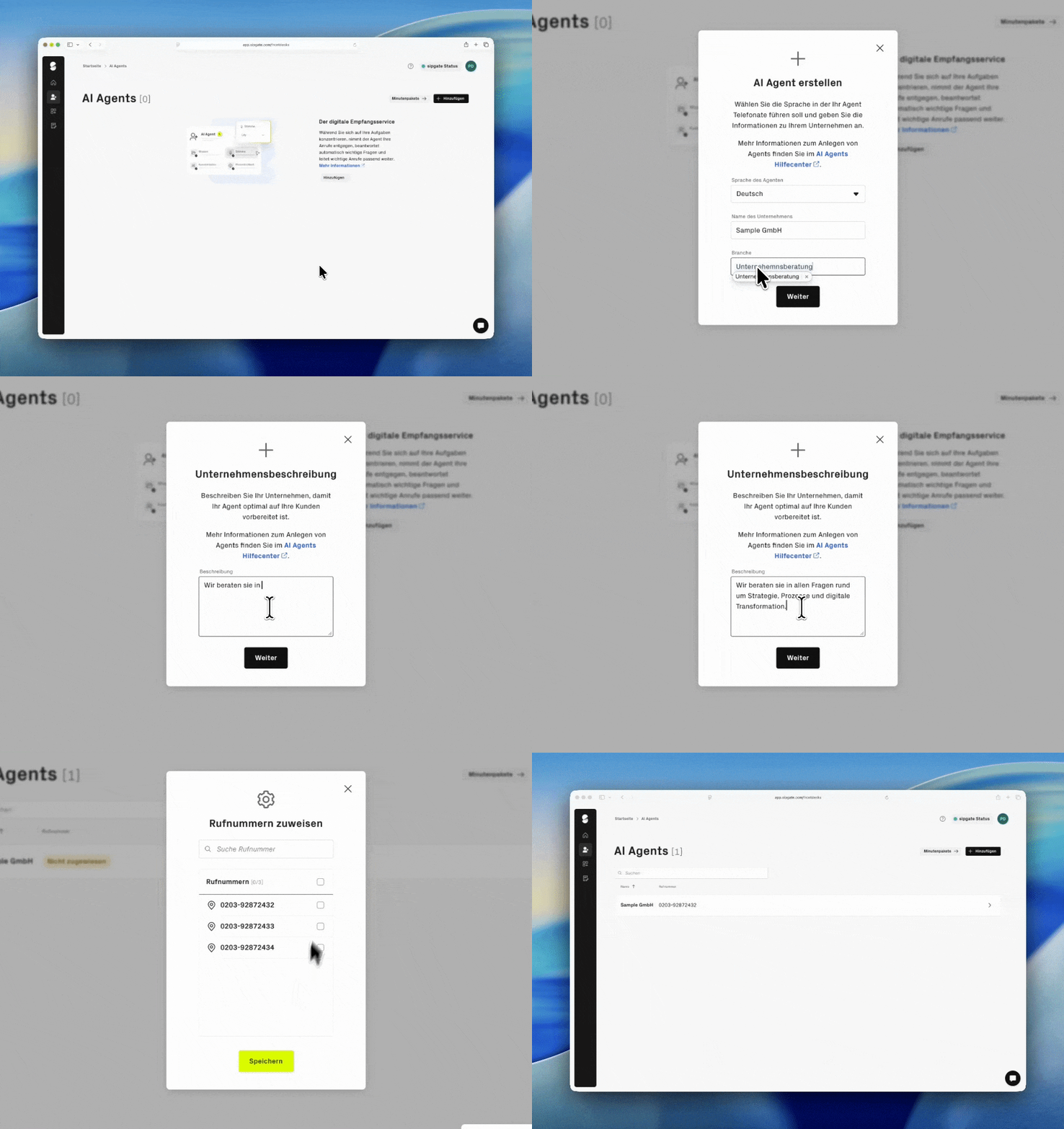
After logging in, you will find the **AI Agents section in the product menu**. There you can add a new agent or select an existing one for editing. Select the **language**in which your agent should conduct phone calls. Enter the **name of your company** and your **industry** . Click on **Next**. Later, you can access all settings that are important for launch via the configuration page.
{% endstep %}
{% step %}
**Store company profile**
Describe your company and your services as if you were explaining them to a customer on the phone: What do you offer, for whom, and what makes you special?
Your agent uses this text to inform callers competently.
{% hint style="info" %}
**Note:** The description must be at least 20 characters long.
{% endhint %}
Click **Next**.
{% endstep %}
{% step %}
**Set greeting text**
The greeting text is automatically prefilled with your company name\
. Adjust it if necessary.
{% hint style="info" %}
**Note:** For legal reasons, the digital service must be mentioned. The text is read aloud verbatim and is not automatically adjusted if the language is changed later.
{% endhint %}
Click **Continue.** Your agent is now being created.
{% endstep %}
{% step %}
**Assign phone number**
After the agent is created, a dialog for\
phone number assignment opens automatically. Select the phone number through which your agent\
should be reachable, and confirm.
{% hint style="info" %}
If no suitable phone number is available, first book a sipgate package with phone numbers, for example a SIP trunk. Your account must be fully set up and verified for this. You can learn more in the article [**Account verification.**](/ai-agents/en/getting-started/verifizierung-des-accounts.md)
{% endhint %}
{% endstep %}
{% step %}
[**Set basic settings**](/ai-agents/en/behavior/stimme-and-sprache.md)
In the basic settings, you define the name and label of the AI Agent. In this section, you also select the voice of the phone assistant. The selection applies to all conversations and can be adjusted at any time.
{% endstep %}
{% step %}
[**Define common customer questions**](/ai-agents/en/behavior/kundenfragen.md)
Under customer questions, you can store typical questions and the corresponding answers that the AI Agent should answer automatically. The questions should be clearly formulated and, if possible, not too similar. A clean separation improves the recognition and answer quality of the phone assistant.
{% endstep %}
{% step %}
[**Set playbooks**](/ai-agents/en/behavior/playbooks.md)
Under playbooks, you define the processes for specific types of calls. Here you determine which steps the AI Agent goes through in a conversation and how it responds to certain keywords. If a conversation should be ended automatically after all steps are completed, this must be explicitly stored in the playbook.
{% endstep %}
{% step %}
[**Integrate agent into routing**](/ai-agents/en/behavior/routing-und-weiterleitung.md)
After configuration, you integrate the AI Agent into routing. From this point on, it handles incoming calls according to the defined rules.
{% endstep %}
{% endstepper %}
### Overview of the key components of the AI Agent
Voice and language
You can determine how the agent sounds and in which language conversations are conducted. These settings apply to all calls and can be adjusted at any time.
Store customer questions or knowledge base
So that your AI Agent can answer inquiries, store the relevant information either as customer questions or in the knowledge base.
[**customer questions**](/ai-agents/en/behavior/kundenfragen.md) are suitable for individual, clearly defined questions with fixed answers, for example about opening hours, address, or appointment scheduling.
[**The knowledge base**](/ai-agents/en/behavior/wissensdatenbank.md) is suitable for more extensive content such as FAQs, product information, or process descriptions. It helps the AI Agent respond more flexibly to different concerns and formulations.
{% hint style="warning" %}
Do not maintain the same content twice in customer questions and the knowledge base. Duplicate or conflicting information can reduce answer quality.
{% endhint %}
Playbooks
The playbooks define workflows for specific types of calls. They control which steps the agent goes through and in what order, and how it responds to specific keywords.
Routing and forwarding
Routing determines when and how calls are forwarded to the agent and during which periods it is active.
{% hint style="info" %}
All settings of an agent can be adjusted at any time. It is not necessary to set all details during the initial setup. Many adjustments arise during ongoing operation.
{% endhint %}
The agent is now ready for use. Further adjustments, evaluations, and optimizations can be made at any time.
---
# Agent Instructions
This documentation is published with GitBook. GitBook is the documentation platform designed so that both humans and AI agents can read, navigate, and reason over technical content effectively. Learn more at gitbook.com.
## Querying This Documentation
If you need additional information that is not directly available in this page, you can query the documentation dynamically by asking a question.
Perform an HTTP GET request on the current page URL with the `ask` query parameter, and the optional `goal` query parameter:
```
GET https://help.sipgate.de/ai-agents/en/getting-started/quickstart-in-10-minuten.md?ask=&goal=
```
`ask` is the immediate question: it should be specific, self-contained, and written in natural language.
`goal` is optional and describes the broader end goal you are ultimately trying to accomplish on behalf of the user. GitBook uses it to tailor the answer towards what is most useful for that goal.
The response will contain a direct answer to the question and relevant excerpts and sources from the documentation.
Use this mechanism when the answer is not explicitly present in the current page, you need clarification or additional context, or you want to retrieve related documentation sections.