> For the complete documentation index, see [llms.txt](https://help.sipgate.de/llms.txt). Markdown versions of documentation pages are available by appending `.md` to page URLs; this page is available as [Markdown](https://help.sipgate.de/ai-agents/en/connections-and-integrations/outbound-agents.md).
# Outbound Agents
### What is an Outbound Agent?
With a **Outbound Agent** your sipgate AI Agent can actively call people and conduct conversations independently. The agent works based on a defined conversation goal and uses information provided to it before the call.
**Typical use cases are:**
* Appointment scheduling & reminders
* Service reminders
* Customer surveys
After the conversation, the agent documents the result. The data can then be analyzed or passed on to connected systems and workflows.
{% hint style="info" %}
**Note:** Please observe the legal and data protection requirements for using Outbound Agents. If you have any questions, we'd be happy to help.
{% endhint %}
### How does the outbound process work?
An Outbound Agent is part of a larger process. In addition to the actual conversation, preparation and follow-up must also be planned.
**The process consists of three phases:**
{% stepper %}
{% step %}
### Preparation
Before the call, it is determined who will be called, why the call is taking place, and what information the agent needs.
This data can come, for example, from a CRM system, a lead list, a spreadsheet, or another target system. It can be retrieved directly before the call or collected and prepared beforehand.
{% endstep %}
{% step %}
### Conversation
The AI Assistant starts the call and conducts the conversation based on the prepared context. How the agent behaves in the conversation is defined via a [**Playbook**](/ai-agents/en/behavior/playbooks.md) defined. The playbook consists of individual tasks that determine which information the agent asks for or provides and in what order the steps are handled.
To provide support, live call functions can be used during the conversation via an MCP server. For example, the agent can query available calendar slots or retrieve or change information in a connected system.
{% endstep %}
{% step %}
### Processing the results
After the conversation, result data can be transmitted via a webhook to a connected system and further processed there via custom workflows. In addition, summaries can be provided by email.
{% endstep %}
{% endstepper %}
### What information does the agent need?
A call order contains the information the agent needs for the call. This usually includes:
* **Outgoing phone number**\
The phone number shown to the called person. It also determines where possible callbacks are routed, for example to a team, a mailbox, or an Inbound Agent. Because the number can be set per call, callbacks can be routed in a targeted way, for example for urgent matters, special cases, or different responsibilities.\
Note: If the outgoing phone number is listed in public directories (e.g. Google Maps), some devices will additionally display the company name.
* **Destination phone number**\
The phone number of the person to be called.
* **Additional information**\
Provide the agent with all information that is important for the call. This includes, for example, name, address, age, last appointment, outstanding amount, booked product, preferred appointment, or previous communication.
In addition, a work instruction can be stored. It describes the goal of the call and what the agent should pay attention to in the conversation, for example whether it should be brief or give particular consideration to certain points.
### How is a call triggered?
A call can be triggered in different ways. Together with our solution consulting team, a suitable interface is planned, tailored to your use case and your existing systems.
**Possible triggers are, for example:**
* time-based calls, for example for reminders or follow-up actions
* triggers via secure HTTP endpoints
* direct triggering from a CRM system
### What happens after the call?
After a conversation is completed, the results are available. Transcripts can be found in the settings of the respective agent. In addition, summaries or result data can be passed on by email, webhook, MCP server, or to a connected target system.
**Plan ahead how different conversation outcomes will be handled:**
* Conversation successfully completed
* Voicemail reached
* Call answered, but use not desired
* Call declined, busy, or number unreachable
* Callback to the displayed phone number
Depending on the use case, a CRM status can then be updated, a follow-up task created, a summary sent, or a new call order prepared.
{% hint style="info" %}
**Note:** The Outbound Agent handles the actual call and conducts the conversation based on the defined process. How voicemails, calls that do not connect, or retry attempts are processed is mapped in the connected workflow. Our solution consultants develop this workflow together with you in the first proof of concept and then hand it over for ongoing operations.
{% endhint %}
### Questions before setup
Before the Outbound Agent is set up, the following points should be defined:
* Which system do the data for the call come from?
* When and by what is a call triggered?
* What information does the agent need in the conversation?
* Which phone number is displayed?
* What happens in the event of a callback?
* How are the conversation results further processed?
### Setup
Outbound Agents are currently set up together with our AI consultants. The conversation goal, conversation flow, required information, call initiation, and follow-up are defined.
Our experts support you with design, setup, and integration into your existing processes.
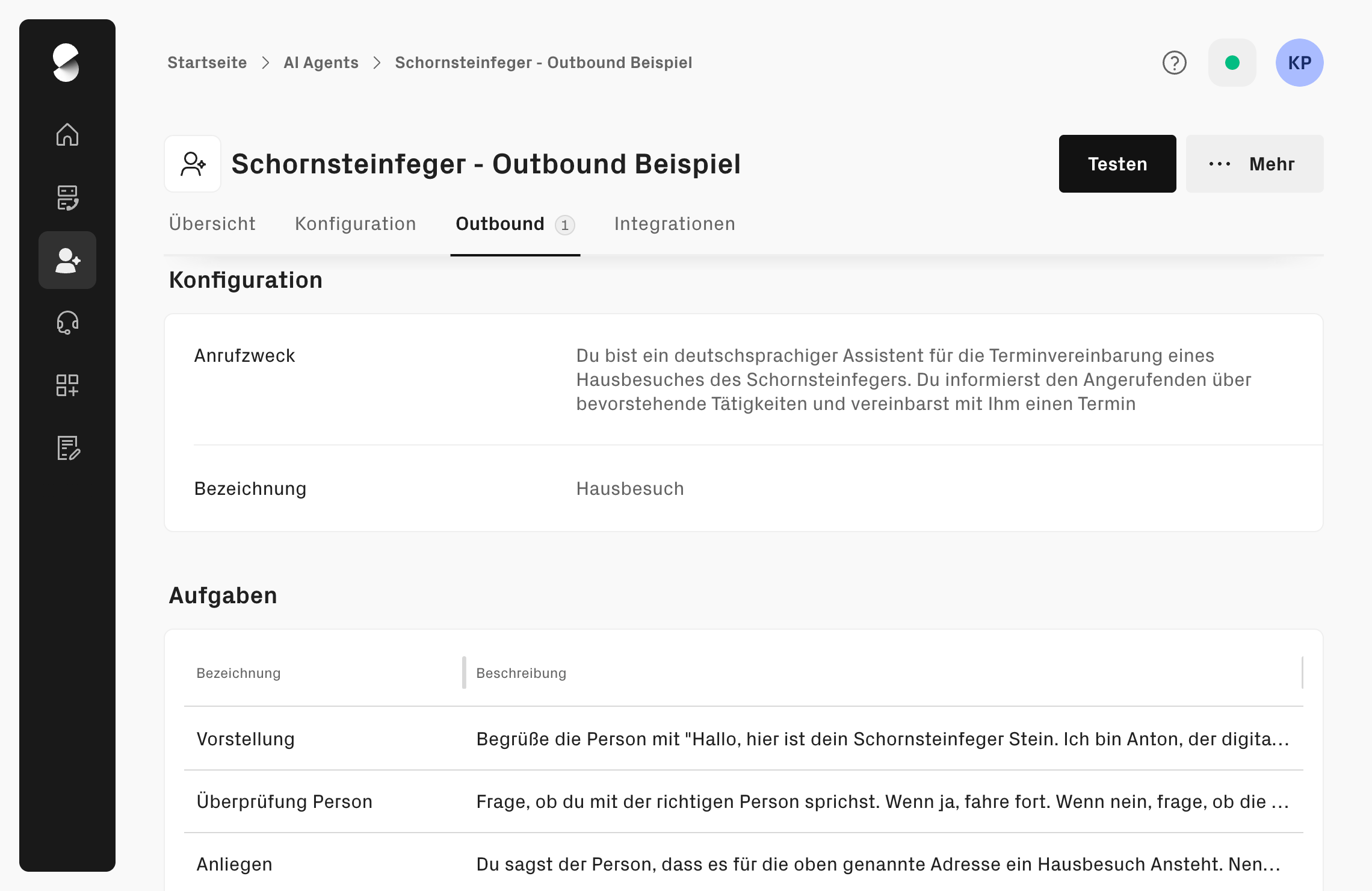
You can view the current configuration of your Outbound Agent in the app web at any time:
### Pricing
The use of Outbound Agents is billed by the minute. In addition, connection costs apply for outgoing calls, which depend on the respective call destination. Further information can be found in the [**current price list.**](https://cdn.prod.website-files.com/678900e941dcd8f65b4519f8/690890314e9ffd30f11ad0c7_eb38f3194fb645a39308cfef5e1834ca_121124_sipgate_Preisliste_PSP.pdf)
### Interested in Outbound Agents?
Outbound Agents are currently set up together with our AI consultants. Our experts support you with design, setup, and integration into your existing processes. If you would like to use an Outbound Agent, please contact [**our team.**](/ai-agents/en/plans-and-costs/enterprise-tarif-leistungen-und-einfuhrungsprozess.md)
---
# Agent Instructions
This documentation is published with GitBook. GitBook is the documentation platform designed so that both humans and AI agents can read, navigate, and reason over technical content effectively. Learn more at gitbook.com.
## Querying This Documentation
If you need additional information that is not directly available in this page, you can query the documentation dynamically by asking a question.
Perform an HTTP GET request on the current page URL with the `ask` query parameter, and the optional `goal` query parameter:
```
GET https://help.sipgate.de/ai-agents/en/connections-and-integrations/outbound-agents.md?ask=&goal=
```
`ask` is the immediate question: it should be specific, self-contained, and written in natural language.
`goal` is optional and describes the broader end goal you are ultimately trying to accomplish on behalf of the user. GitBook uses it to tailor the answer towards what is most useful for that goal.
The response will contain a direct answer to the question and relevant excerpts and sources from the documentation.
Use this mechanism when the answer is not explicitly present in the current page, you need clarification or additional context, or you want to retrieve related documentation sections.