> For the complete documentation index, see [llms.txt](https://help.sipgate.de/llms.txt). Markdown versions of documentation pages are available by appending `.md` to page URLs; this page is available as [Markdown](https://help.sipgate.de/ai-agents/en/behavior/stimme-and-sprache.md).
# Voice & Language
In this area, you define how your AI phone assistant sounds and how it speaks with callers. The settings for voice, language, and greeting apply to all conversations of this AI Agent and can be adjusted at any time.
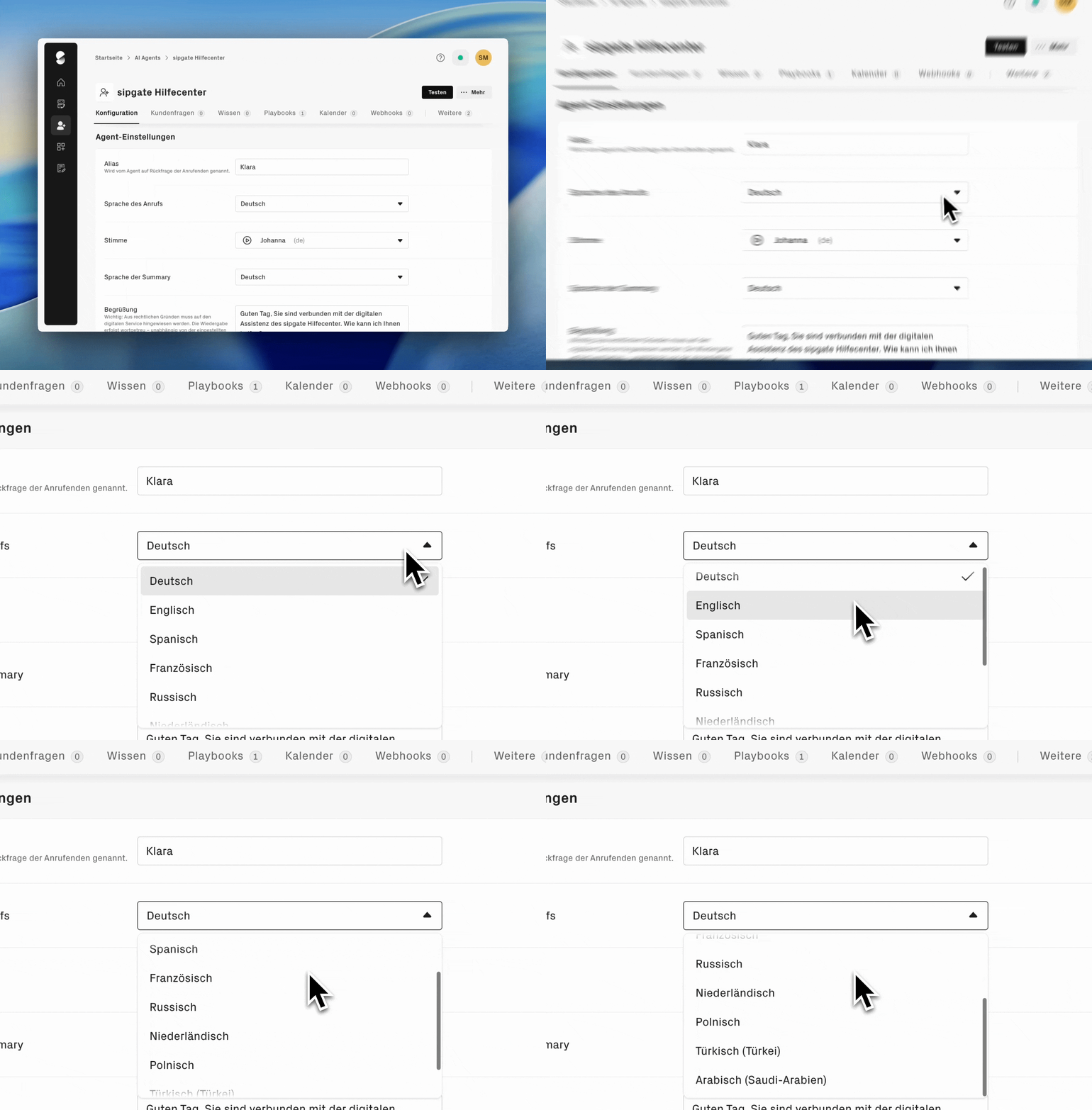
### Select AI Agent language
Choose the language in which your agent should conduct conversations. Available options are: German, English, Spanish, French, Polish, Dutch, Arabic, Turkish, Russian.
The language determines how your agent understands and responds to callers. The agent always replies in the selected language, regardless of which language the caller speaks.
{% hint style="info" %}
**Note:** If your company regularly receives calls in different languages, it is recommended to set up a separate agent for each language.
{% endhint %}
### Choose voice
Choose a voice that matches your company and target audience. The voice influences how professional and understandable the agent is perceived to be.
#### Recommended voices
There are many voices to choose from. To save you from testing them all yourself, our Conversation Experience Team has evaluated the voices for clarity, pronunciation, and naturalness, including with more complex content such as numbers, URLs, anglicisms, or spontaneous colloquial speech. These four voices stood out in particular:
| Voice | Language | Character |
| -------- | -------- | --------------------- |
| Philipp | German | Neutral & reliable |
| Ramona | German | Calm & professional |
| Benjamin | German | Efficient & clear |
| Laura | German | Direct & professional |
{% hint style="info" %}
**Note on proper names:** Company names, street names, and technical terms are pronounced differently depending on the voice. Test your agent with a test call before using it. If a voice does not pronounce your company name correctly, switch voices.
{% endhint %}
#### Formal or informal?
Choose the voice that sounds most natural for your use cases. Test the desired voice before use with typical conversation scenarios, especially if numbers, proper names, or technical terms come up frequently. Differences are best seen in practical use.
{% hint style="success" icon="envelopes" %}
**Questions or feedback about voices?**
The Conversation Experience Team can help: [**stimmen-feedback@sipgate.de**](mailto:stimmen-feedback@sipgate.de)
{% endhint %}
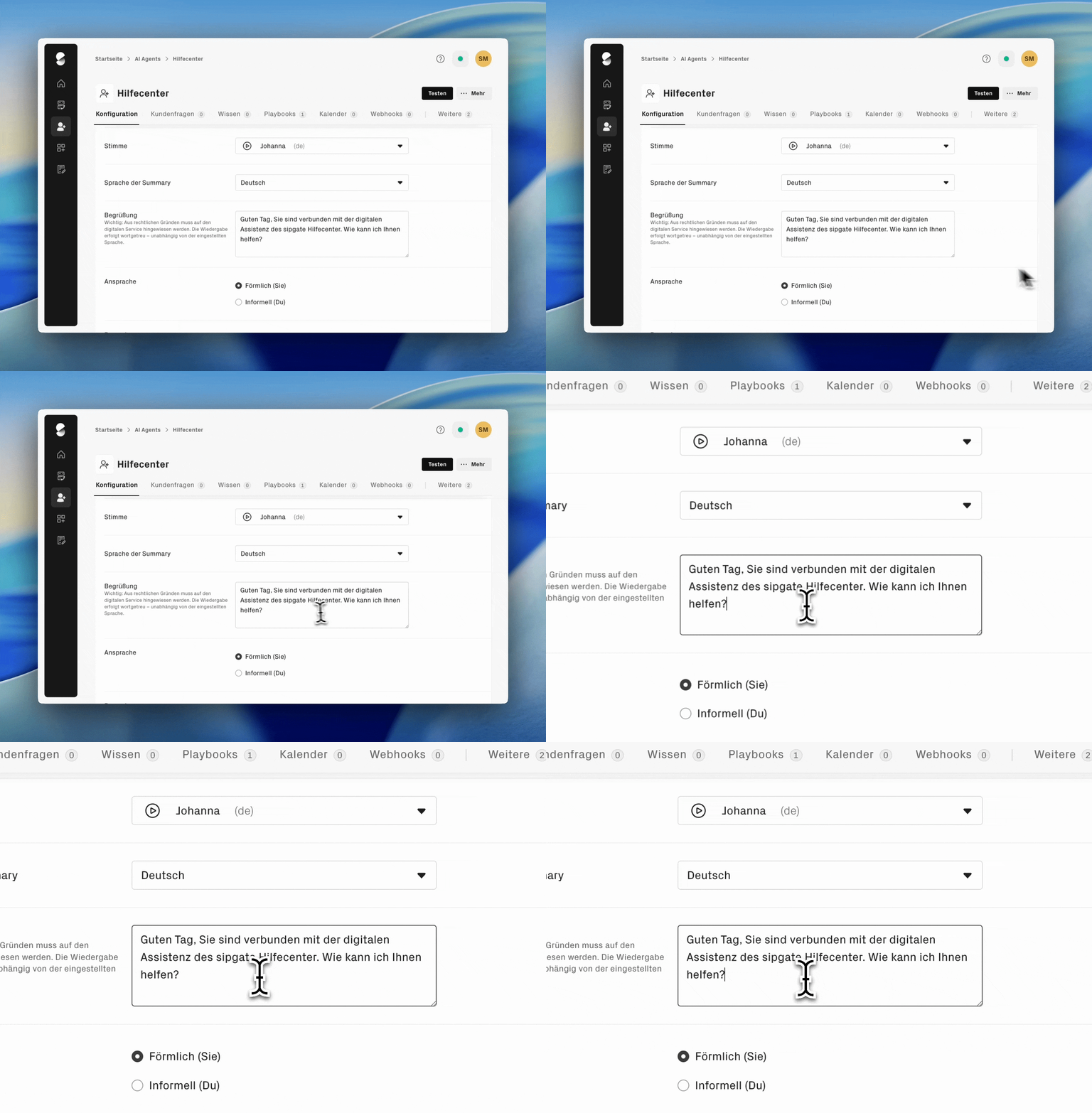
### Set address style
Specify whether your agent addresses callers with **formal you** or **informal you** .
* **formal you** (Formal): suitable for customer service, B2B, and conservative industries
* **informal you** (Informal): suitable for modern companies and younger target audiences
The selected address style determines only the use of **"formal you"** or **"informal you"**. It does not affect the agent's overall language style. Polite and respectful behavior is stored by default, regardless of the selected form of address.
The form of address applies to all conversations of this agent and should match your company communication.
### Customize greeting text
You can individually define the greeting text of your AI Agent and adapt it to your company communication.
{% hint style="warning" %}
**Important:** The greeting text must include a note that this is a digital service. The text is reproduced verbatim, regardless of the selected language.
{% endhint %}
### **Barge-in**
With barge-in, you define whether callers can interrupt the AI Agent while it is speaking. If the function is active, the agent stops immediately as soon as the caller speaks and listens. This makes conversations more natural and reduces waiting time.
**Where do I find the setting?**
In the logged-in area under Account management → AI Agents → select agent → Agent settings. Depending on the account configuration, the feature may need to be activated first. If you have any questions, contact sipgate customer support.
**Which options are available?**
Under interruption, you can choose between two settings:
* **Agent speaks to the end without interruption:** The agent cannot be interrupted while answering and speaks its entire response to the end.
* **Caller can interrupt agent:**
* As soon as the caller speaks, the agent stops and listens.
* The greeting message is excluded from this and cannot be interrupted for privacy reasons.
* If the agent is interrupted, the already generated response remains visible in the transcript, even if it was not spoken in full.
{% hint style="info" %}
**Note:** Barge-in is not enabled by default. To allow callers to interrupt the agent, you must select and save the corresponding option in the agent settings.
{% endhint %}
### Silence response time
The silence response time determines how long the AI Agent waits after the caller has stopped speaking.
It is set by default so that conversations feel as natural as possible. If your agent responds too quickly or too slowly, contact [**customer support**](https://www.sipgate.de/kontakt). The response time can be adjusted if needed.
### Enable background noise (optional)
Background noise such as office noise can optionally be enabled. This setting shapes the atmosphere of the conversation and can create the impression of a real workplace.
### Language of the conversation summary
Specify in which language conversation summaries are created.
**Example:** Your agent conducts conversations in English, but your team works in German. Set the summary language to German so that all employees can use the logs directly.
---
# Agent Instructions
This documentation is published with GitBook. GitBook is the documentation platform designed so that both humans and AI agents can read, navigate, and reason over technical content effectively. Learn more at gitbook.com.
## Querying This Documentation
If you need additional information that is not directly available in this page, you can query the documentation dynamically by asking a question.
Perform an HTTP GET request on the current page URL with the `ask` query parameter, and the optional `goal` query parameter:
```
GET https://help.sipgate.de/ai-agents/en/behavior/stimme-and-sprache.md?ask=&goal=
```
`ask` is the immediate question: it should be specific, self-contained, and written in natural language.
`goal` is optional and describes the broader end goal you are ultimately trying to accomplish on behalf of the user. GitBook uses it to tailor the answer towards what is most useful for that goal.
The response will contain a direct answer to the question and relevant excerpts and sources from the documentation.
Use this mechanism when the answer is not explicitly present in the current page, you need clarification or additional context, or you want to retrieve related documentation sections.