> For the complete documentation index, see [llms.txt](https://help.sipgate.de/llms.txt). Markdown versions of documentation pages are available by appending `.md` to page URLs; this page is available as [Markdown](https://help.sipgate.de/ai-agents/en/behavior/routing-und-weiterleitung.md).
# Routing and Forwarding
Through routing, you determine when and via which path incoming calls reach your AI Agent. Only by integrating it into routing can the AI telephone assistant automatically answer and process calls. Depending on whether you are already a sipgate customer or use an external phone system, the setup of routing differs slightly.
### Set up routing in the sipgate cloud phone system
If you use sipgate AI Agents with an existing sipgate account, the AI Agent is integrated directly into your existing routing. You can use all the familiar sipgate routing functions.
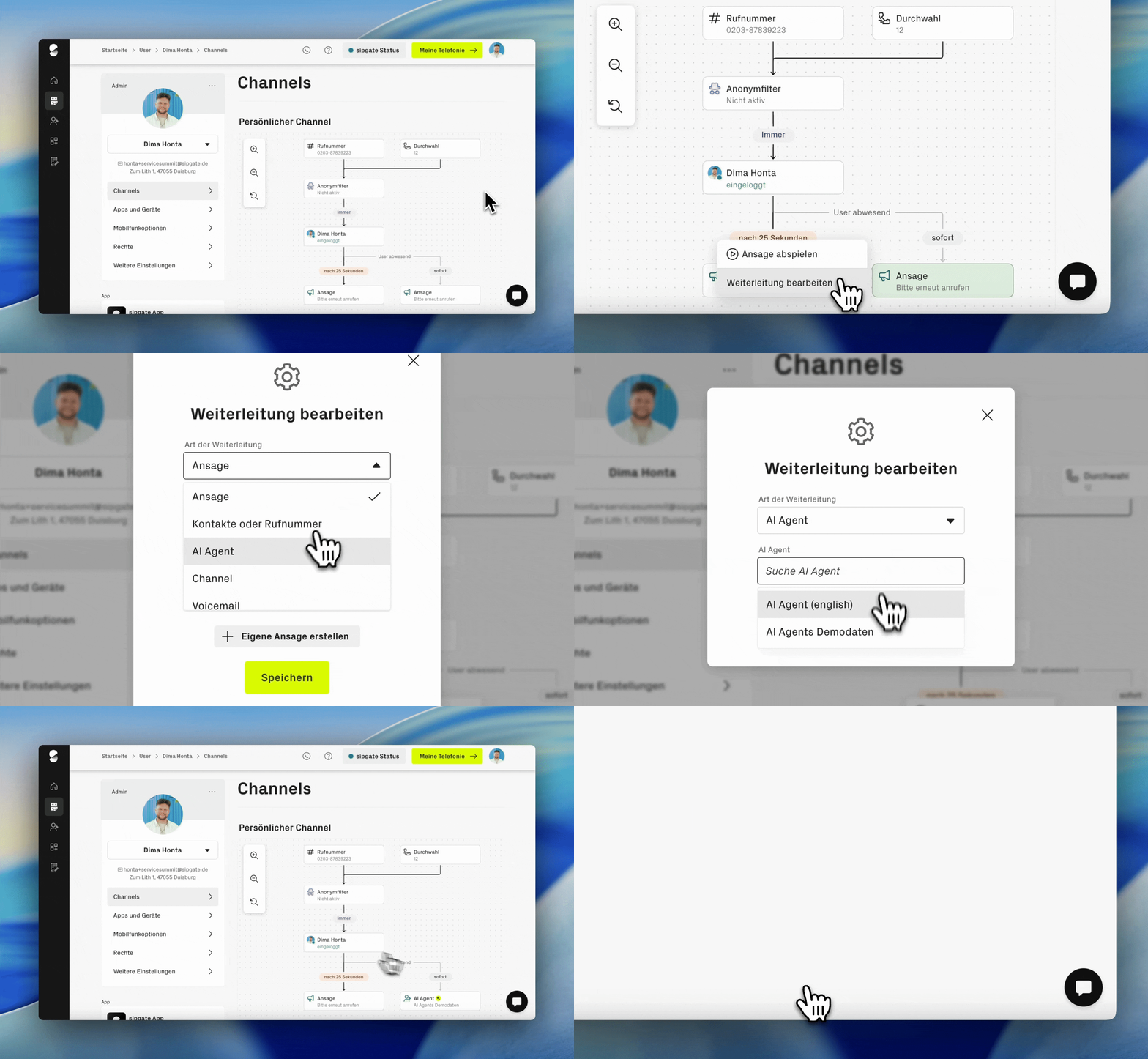
#### Step by step: integrate AI Agent into sipgate routing
{% stepper %}
{% step %}
**Open routing**
Log in to your sipgate account and open the routing in which the agent should be used. This can be a personal routing, a group routing, or a newly created routing.
{% endstep %}
{% step %}
**Define time period**
Determine when the routing should be active and forward calls to the AI Agent. Typical scenarios are:
* Outside business hours
* When the team is absent
* On public holidays or weekends
* When the phone switchboard is overloaded
{% endstep %}
{% step %}
**Forward to AI Agent**
Select "AI Agents" or the phone number of the desired agent as the forwarding destination.
{% endstep %}
{% step %}
**Confirm forwarding**
Confirm the forwarding to the agent.
{% endstep %}
{% step %}
**Save and activate routing**
After saving, calls will be automatically forwarded to the AI Agent during the specified period. Alternatively, you can also specifically integrate the agent into a holiday routing or absence routing.
{% endstep %}
{% endstepper %}
### Set up routing without the sipgate cloud phone system
You can also use sipgate AI Agents without the sipgate cloud phone system. In this case, you integrate the individual agent phone number into your existing phone system. This allows the AI telephone assistant to handle calls that come through your current telephone system.
#### Step by step: integrate AI Agent into external phone system
{% stepper %}
{% step %}
**Configure AI Agent**
Set up your sipgate AI Agent first via the configuration page and define [**Playbooks**](/ai-agents/en/behavior/playbooks.md)**,** [**customer questions**](/ai-agents/en/behavior/kundenfragen.md) and other settings.
{% endstep %}
{% step %}
**Find the agent's individual phone number**
On your agent's configuration page, you will find an individual phone number. Your agent is reachable at this number at any time.
{% endstep %}
{% step %}
**Integrate phone number into your routing**
Enter this phone number as the forwarding destination in your existing phone system. From this point on, your system will forward calls to the sipgate AI Agent, which will then take over.
{% endstep %}
{% endstepper %}
{% hint style="info" %}
**Important notes**
* Routing determines when callers reach the agent, not how the conversation is conducted.
* The conversation logic is defined via conversation guidance, knowledge, and playbooks.
* Changes to routing take effect immediately for future calls.
{% endhint %}
---
# Agent Instructions
This documentation is published with GitBook. GitBook is the documentation platform designed so that both humans and AI agents can read, navigate, and reason over technical content effectively. Learn more at gitbook.com.
## Querying This Documentation
If you need additional information that is not directly available in this page, you can query the documentation dynamically by asking a question.
Perform an HTTP GET request on the current page URL with the `ask` query parameter, and the optional `goal` query parameter:
```
GET https://help.sipgate.de/ai-agents/en/behavior/routing-und-weiterleitung.md?ask=&goal=
```
`ask` is the immediate question: it should be specific, self-contained, and written in natural language.
`goal` is optional and describes the broader end goal you are ultimately trying to accomplish on behalf of the user. GitBook uses it to tailor the answer towards what is most useful for that goal.
The response will contain a direct answer to the question and relevant excerpts and sources from the documentation.
Use this mechanism when the answer is not explicitly present in the current page, you need clarification or additional context, or you want to retrieve related documentation sections.