> For the complete documentation index, see [llms.txt](https://help.sipgate.de/llms.txt). Markdown versions of documentation pages are available by appending `.md` to page URLs; this page is available as [Markdown](https://help.sipgate.de/ai-agents/en/behavior/kundenfragen.md).
# Customer Questions
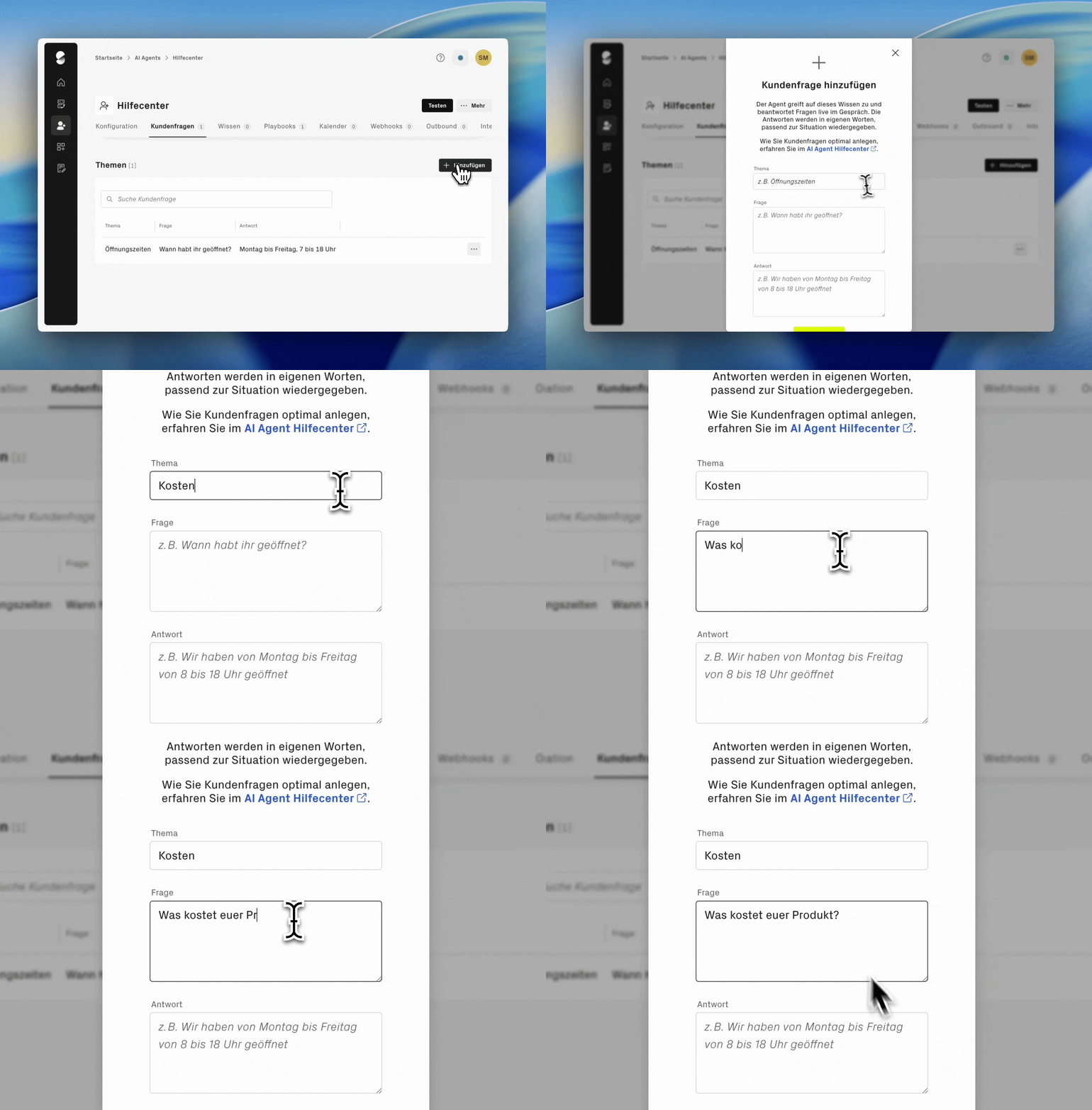
In the area **customer questions** Enter typical queries about opening hours, services, prices, or processes, as well as the matching answers to them. The clearer the questions are formulated, the more reliably the AI Agent recognizes the request and can respond precisely. In this article, you will learn how to formulate questions and answers for your AI phone assistant in the best possible way and derive the right topics from your support inquiries.
{% hint style="info" %}
If the agent was created via a URL, initial customer questions were usually generated automatically based on the website. Review the questions and answers, adjust them if necessary, and add more content according to your needs.
{% endhint %}
{% hint style="warning" %}
**Calendar integration active?** Do not store any customer questions about appointments, booking appointments, or calendar availability. The AI Agent automatically recognizes such requests via the calendar integration and books appointments directly in Cal.com. Additional customer questions on this topic can cause the agent to misclassify the request and not initiate an appointment booking.
{% endhint %}
### How to formulate customer questions correctly
{% stepper %}
{% step %}
**Clearly separate different topics from one another**
Different topics should be clearly distinct. Questions that are too similar on different topics can confuse the AI Agent and worsen recognition quality.
**Not recommended:**
* How do I reach the hotline?
* How do I reach customer service?
These questions are formulated almost identically and refer to the same information. The AI Agent can hardly distinguish between them and does not know which answer is meant in which context.
**Recommended:**
* How do I reach the hotline?
* At what times is the hotline staffed?
These questions address different aspects of the topic (contact options vs. availability times). The AI Agent can clearly recognize which information is being asked for and provide the appropriate answer.
{% endstep %}
{% step %}
**Store multiple phrasings for the same topic**
You can enter multiple phrasings for the same request per customer question. This is useful because customers often ask the same question in different ways. The AI Agent thus learns to recognize different ways of expressing the same request and assign them correctly.
**Example - all three questions lead to the same answer:**
* How long does delivery take?
* When will my order arrive?
* What is the delivery time?
{% endstep %}
{% step %}
**Formulate specific rather than general questions**
The more specific the question, the better the AI Agent can assign it. Instead of general questions like "What do you offer?", prefer specific questions such as "What tariffs are available for business customers?"
{% endstep %}
{% endstepper %}
### How to formulate answers for the AI Agent correctly
Answers should contain all important information in 2-3 sentences, without unnecessary filler words or embellishments.
**Not recommended:**
* Our opening hours are designed to be very customer-friendly. We are open Monday to Friday and are also available on Saturdays. Specifically, that means: Monday to Friday 9 a.m. to 6 p.m., Saturday 10 a.m. to 2 p.m.
**Recommended:**
* We are available Monday to Friday from 9 a.m. to 6 p.m., and Saturdays from 10 a.m. to 2 p.m. We are closed on Sundays.
### Derive customer questions from support tickets
You can find the best customer questions for your AI Agent in your existing support inquiries, among other places. These show which topics your customers are actually concerned about.
**Here is how to proceed:**
* Analyze past support tickets and email inquiries
* Note the most common topics and recurring questions
* Form clear question-and-answer pairs for the AI Agent from this
* Prioritize questions that are asked particularly often
### **Test after setup**
After you have entered the customer questions, you should test your AI Agent thoroughly. Call the phone assistant and ask the questions in different phrasings. Adjust the questions if recognition is uncertain or incorrect answers are given.
---
# Agent Instructions
This documentation is published with GitBook. GitBook is the documentation platform designed so that both humans and AI agents can read, navigate, and reason over technical content effectively. Learn more at gitbook.com.
## Querying This Documentation
If you need additional information that is not directly available in this page, you can query the documentation dynamically by asking a question.
Perform an HTTP GET request on the current page URL with the `ask` query parameter, and the optional `goal` query parameter:
```
GET https://help.sipgate.de/ai-agents/en/behavior/kundenfragen.md?ask=&goal=
```
`ask` is the immediate question: it should be specific, self-contained, and written in natural language.
`goal` is optional and describes the broader end goal you are ultimately trying to accomplish on behalf of the user. GitBook uses it to tailor the answer towards what is most useful for that goal.
The response will contain a direct answer to the question and relevant excerpts and sources from the documentation.
Use this mechanism when the answer is not explicitly present in the current page, you need clarification or additional context, or you want to retrieve related documentation sections.